

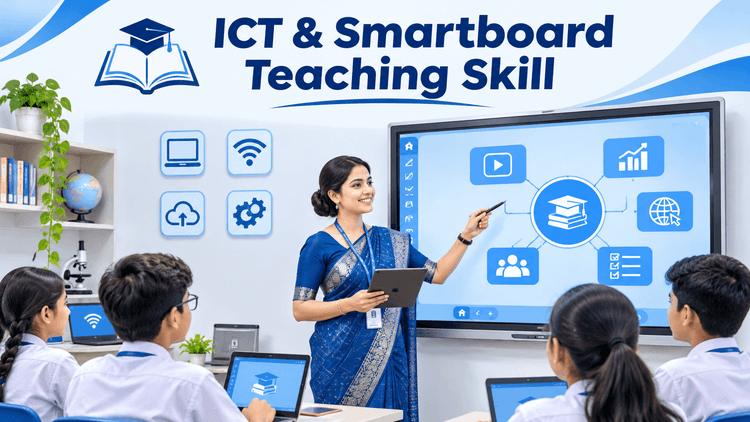
Walking into a reputed CBSE, ICSE, or international school interview in Delhi NCR with only a textbook and a piece of chalk is no longer enough. Under the National Education Policy (NEP 2020) guidelines, premier schools have replaced traditional blackboards with Interactive Flat Panels (Smartboards), digital learning management systems, and multimedia classrooms.
During school recruitment drives, principals and Academic Directors evaluate B.Ed freshers on one crucial question:
"Can this candidate blend strong subject knowledge with modern digital pedagogy to keep today’s screen-native students engaged?"
Mastering ICT (Information and Communication Technology) skills in B.Ed is the single fastest way to stand out from hundreds of applicants and secure higher starting packages in top private schools. Here is a practical guide to the exact digital tools and smartboard demo strategies that win interview panels over.
1. Five Essential ICT Skills Every B.Ed Student Must Master
Before attending campus placement drives or school walk-in interviews, ensure you are comfortable using these five classroom technologies:
1. Interactive Smartboard Navigation & Digital Annotation:
Learn how to split screens, zoom into high-resolution diagrams, highlight live text with digital pens, and save annotated board notes as instant PDFs for student revision.
2. Clean Visual Presentation Design (PowerPoint & Canva):
Move beyond text-heavy slides. Top schools look for educators who use clean visuals, minimal bullet points, step-by-step animations, and embedded short video clips to clarify abstract concepts.
3. Gamified Formative Assessments (Kahoot, Quizizz & Google Forms):
Show interviewers that you know how to run a quick 3-minute live quiz at the end of a lesson to verify student comprehension instantaneously.
4. Subject-Specific Virtual Simulations:
For Science & Maths: Know how to demonstrate live concepts using free tools like PhET Interactive Simulations (for Physics/Chemistry) or GeoGebra (for Geometry and Algebra).
For Social Sciences & Languages: Use Google Earth for Geography/History timelines and interactive mind-mapping tools for literature.
5. Ethical AI Assistance for Lesson Planning:
Understand how to use AI tools responsibly to generate differentiated worksheets for slow and fast learners, rubric templates, and creative real-world classroom analogies.
2. Smartboard Teaching Demo Tips: How to Ace Your 15-Minute Class
The live demo class is the deciding stage of every private school interview. Follow these proven smartboard teaching demo tips to leave a lasting impression:
Avoid "Death by PowerPoint": Never stand behind a podium reading text off a slide. Keep your slides strictly visual (images, graphs, 3–4 keywords per slide) and explain concepts in your own voice while maintaining eye contact.
Use the "Dual-Mode" Technique: Combine digital visuals with active writing. Display a diagram on the smartboard, then pick up the stylus to label parts live while asking students questions.
Start with a Digital Hook: Open your 15-minute demo with a 20-second visual riddle, a short real-world image, or an interactive poll on the screen to grab attention immediately.
Keep a Backup Plan Ready: Technology can glitch during interviews. Always carry your presentation on a USB drive, keep a cloud copy in Google Drive, and be prepared to pivot smoothly to a marker/whiteboard if Wi-Fi drops without losing composure.
Include a Quick Recap Slide: End your class with a 2-minute interactive recap or a quick 3-question visual quiz to demonstrate structured time management.
3. Why Practical ICT Lab Exposure During B.Ed Makes the Difference
Reading about educational technology in an exam paper does not build classroom confidence. Real fluency comes only when future educators practice inside dedicated ICT laboratories and receive structured feedback during micro-teaching sessions.
Students enrolled in the best B.Ed college in Ghaziabad gain an immediate career edge when their curriculum pairs NCTE academic theory with live smart-classroom training.
At the IPEM B.Ed department, aspiring teachers undergo hands-on training in ICT-enabled pedagogy, multimedia lesson-plan creation, educational psychology labs, and micro-teaching simulations—alongside a rigorous 16-week internship in reputed CBSE schools across Delhi NCR. This practical preparation ensures graduates walk into school interviews confident, tech-ready, and prepared to lead modern classrooms from Day 1.
Frequently Asked Questions (FAQs)
Q1. Why are ICT skills important for B.Ed students in 2026?
Ans: Top CBSE, ICSE, and international schools use smartboards, virtual labs, and digital assessment platforms daily. Teachers with practical ICT fluency engage students better, save lesson-planning time, and get prioritized during private school hiring.
Q2. What should I put on my PowerPoint slides for a school teaching demo?
Ans: Keep slides clean and visual—use high-resolution diagrams, minimal text (maximum 4–5 short points per slide), clear typography, and a short 2-minute recap activity at the end. Avoid pasting long textbook paragraphs onto slides.
Q3. Does IPEM Ghaziabad provide practical smart-classroom and ICT training in B.Ed?
Ans: Yes. IPEM’s NCTE-approved and CCSU-affiliated B.Ed programme includes dedicated ICT laboratories, micro-teaching practice, smartboard presentation training, and placement support with reputed schools across Ghaziabad and Delhi NCR.